
Download AnyToSpeech – Free AI Text‑to‑Speech Converter, Multilingual Voices & Secure Online Tool
Overview
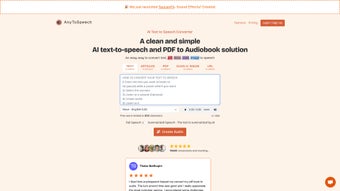
AnyToSpeech is a cloud‑based, AI‑driven text‑to‑speech (TTS) platform that turns any written material into natural‑sounding audio. Whether you have a plain‑text document, a PDF report, scanned images, or even a photograph of a handwritten note, AnyToSpeech can read it aloud in a matter of seconds. The service is built for accessibility, productivity, and convenience, making it a perfect companion for students, professionals, content creators, and anyone who prefers listening over reading.
Its intuitive web interface eliminates the need for complex installations, while the underlying neural‑network models ensure that each voice sounds authentic, with appropriate intonation, pauses, and emphasis. The tool supports major world languages—including English, Spanish, French, German, and Arabic—each with multiple male and female voice options, allowing users to match the tone of their content. Because the conversion happens entirely online, you benefit from automatic updates, security patches, and a continuously expanding voice library without ever having to download additional software.
Whether you need to create audiobooks, podcast snippets, language‑learning material, or accessibility solutions for visually‑impaired users, AnyToSpeech offers a free, secure, and scalable way to transform text into high‑quality speech.
Key Features
- Multi‑Format Support: Upload .txt, .docx, .pdf, .rtf, image files (JPEG, PNG) or provide a URL; AnyToSpeech extracts text using OCR when needed.
- AI‑Powered Natural Voices: Over 120 realistic voices covering different ages, genders, and regional accents.
- Multilingual Capability: Native‑level pronunciation for English, Spanish, French, German, Arabic, plus expanding language catalog.
- Adjustable Speech Settings: Control speed, pitch, volume, and add subtle background music or sound effects.
- Secure Cloud Processing: End‑to‑end encryption ensures uploaded documents remain private; files are auto‑deleted after conversion.
- Download Options: Export audio as MP3, WAV, or OGG, with selectable bitrate for high‑fidelity results.
- Batch Conversion: Convert multiple files in one session, ideal for large document libraries or classroom materials.
- API Access: Developers can integrate AnyToSpeech into apps, e‑learning platforms, or customer‑service bots via a RESTful API.
- Cross‑Platform Accessibility: Works on any modern browser, with responsive design for desktop, tablet, and mobile.
- Free Tier & Affordable Upgrades: Unlimited conversions for personal use; premium plans unlock faster processing and premium voice packs.
Installation, Usage & Compatibility
Getting Started – No Download Required
Since AnyToSpeech is a web‑based service, there is no traditional installation process. Simply navigate to the official website, create a free account (or continue as a guest for limited usage), and you’re ready to convert. The registration step is optional, but signing up unlocks cloud storage for your past projects and gives you access to premium voice selections.
Step‑by‑Step Conversion Guide
- Upload Your Content: Drag‑and‑drop a file or paste text into the editor. For scanned images or PDFs, the built‑in OCR engine automatically extracts the text.
- Select Language & Voice: Choose the desired language, then browse the voice catalog. Preview each voice with a short sample before confirming.
- Fine‑Tune Settings: Adjust speech speed (0.5x–2x), pitch, and volume sliders. You may also add a short intro music clip from the royalty‑free library.
- Generate Audio: Click “Convert” and wait a few seconds for the AI to synthesize the speech. The progress bar shows real‑time processing status.
- Download & Share: Once ready, download the file in MP3, WAV, or OGG format, or share a secure link directly with colleagues.
Operating System Compatibility
Because AnyToSpeech runs entirely in the browser, it is compatible with any modern operating system that supports HTML5 and JavaScript. This includes Windows 10/11, macOS Catalina and later, Linux distributions with recent browsers, as well as mobile platforms such as Android 8.0+ and iOS 13+. The responsive UI automatically adapts to screen size, ensuring a smooth experience on laptops, desktops, tablets, and smartphones.
System Requirements & Recommendations
- Latest version of Chrome, Firefox, Edge, or Safari.
- Internet connection with at least 3 Mbps upload speed for large PDF or image files.
- Optional: A headset or external speakers for immediate playback.
For power users, the API can be accessed from any server‑side language (Python, Node.js, PHP) using standard HTTPS calls, making integration with existing workflows straightforward.
Pros, Cons & Frequently Asked Questions
Pros
- Completely web‑based – no software download or installation.
- Broad file‑type support, including OCR for images and scanned PDFs.
- High‑quality AI voices that sound natural and expressive.
- Multilingual support with regional accents.
- Secure, encrypted processing with automatic file deletion.
- Free tier sufficient for casual users; affordable premium plans.
- API for developers and batch processing for large projects.
Cons
- Requires an internet connection; offline usage is not possible.
- Free tier imposes daily conversion limits.
- Advanced voice customization (e.g., emotional tone) is limited to premium plans.
- Large PDFs may take longer to process due to OCR.
FAQ
Can I use AnyToSpeech on a mobile device?
Yes. The platform is fully responsive and works on Android and iOS browsers. All conversion features, including file upload and voice selection, are accessible from a smartphone or tablet.
Is my uploaded content private?
AnyToSpeech uses TLS encryption for data in transit and encrypts files at rest. Uploaded documents are automatically deleted from the server after the conversion is complete, unless you choose to save them in your personal cloud library.
What languages are currently supported?
The free version supports English, Spanish, French, German, and Arabic. Additional languages are being added regularly, and premium users gain early access to new voice packs.
Can I integrate AnyToSpeech into my e‑learning platform?
Absolutely. The service offers a RESTful API with documentation, allowing developers to programmatically send text and receive audio files. API keys are provided with premium subscriptions.
What file formats can I upload?
Supported formats include .txt, .docx, .pdf, .rtf, .odt, and image files such as .jpg, .jpeg, .png, and .bmp. For image‑based files, the built‑in OCR extracts the text before synthesis.
Conclusion & Call to Action
AnyToSpeech stands out as a versatile, user‑friendly AI text‑to‑speech solution that bridges the gap between written content and audible media. Its zero‑install approach, robust OCR capabilities, and expansive library of natural voices make it a top choice for educators, marketers, developers, and anyone who values accessibility. While the reliance on an internet connection may be a limitation for some offline scenarios, the security measures and automatic updates more than compensate for that trade‑off.
Whether you need a quick audio snippet for a presentation, an entire audiobook for your audience, or an API that powers a multilingual chatbot, AnyToSpeech delivers reliable performance at no cost for basic usage, with flexible premium options for power users. Ready to give your documents a voice? Download AnyToSpeech now and start converting text to speech instantly—securely, accurately, and for free.
Overall Rating: 4.5 / 5
Pros: Extensive voice library, OCR support, web‑only convenience, strong security.
Cons: Requires internet, limited offline use, premium needed for advanced customisation.



.png)



